eLearning Blog

Posts under the ‘eLearning News’ category

Respondus 4.0 Training Webinars: March 27 & 28

Tuesday, March 19th, 2013

We’re holding training webinars for creating content in Respondus 4.0 at the end of the month, and I hope you’ll join us.

These free sessions are only 45 minutes long and are a great opportunity for those who are new to Respondus 4.0. They are also perfect for someone who has used the software before but wants a refresher.

Webinar: Creating Content with Respondus 4.0 (45 minutes)

- Wednesday, March 27th at 2 p.m. ET - Register

- Thursday, March 28th at 4 p.m. ET - Register (Repeat Session)

The sessions will cover the following:

  • Overview of Respondus 4.0
  • Using the Import Wizard to bring in questions from other sources, including formatting tips for Word files
  • Copying items from other Respondus files from the Edit Tab
  • Accessing publisher test banks through the Respondus Test Bank Network
  • Using the Retrieval Tab to reuse and/or edit assessments already in your LMS
  • A chance to ask questions

Space is limited so I recommend signing up soon! Feel free to forward this invitation to instructors, instructional designers, or other support contacts who use or are interested in using Respondus 4.0

Instructure Releases Canvas for Android

Thursday, February 14th, 2013

Students can now access Canvas courses from their Android devices

Instructure has released a new Canvas Android app, “Canvas for Android,” which enables mobile access to the Canvas learning platform from Android devices. Faculty and students can download the app for free from the Google Play store.

“The Canvas for Android app is designed to make it easy for faculty and students to stay connected to their courses, including courses from their institution or the Canvas Network,” said Brian Whitmer, co-founder and chief product officer at Instructure. “We’ve always pushed information to Android devices through our email and text messaging notification feature, but now users can participate in their courses through a native app designed specifically for learning.”

Canvas for Android provides an elegant way for students to access their Canvas To-Do list, Assignments, Calendar, Grades and more. It also enables them to read and compose messages using Canvas Conversations, a secure, built-in messaging system that connects participants in a course.

Since the initial launch of Canvas, Instructure has demonstrated its commitment to native apps for mobile devices. In 2011, the company released SpeedGrader for iPad, a powerful mobile grading app, and Canvas for iOS, an iPhone and iPad app with course functionality for students and instructors. With the release of Canvas for Android, Instructure is taking the first of many steps to bring a native Canvas experience to Android users.

“We recognize that the modern learner is mobile, and we believe a native mobile experience is critical to the learning experience,” said Devlin Daley, co-founder and chief technology officer at Instructure. “We didn’t decide after the fact to build mobile apps because it was a hip thing to do. We made an intentional decision to include mobile apps from the start – at no extra charge.”

To learn more, visit the Canvas for Android page in the Google Play store.

New Workshop: Google Tools for Great Teaching

Thursday, January 31st, 2013

Google offers a significant number of collaboration tools, and instructor Chad Norman has experimented with many of them in an instructional context.    We will survey six of the most useful applications and give examples of how they can be used in collaborative projects, real-time student feedback, and many other ways.

Choose from three times!

  • Tuesday, Feb 12 2-3 PM
  • Thursday, March 21 10-11 AM
  • Wednesday, April 17 10-11 AM

All sessions will be held in VanPelt and Opie Library room 244. Each session’s enrollment will be limited to 25. Please register by calling 487-2046, or register online by clicking on the workshop name, listed on the right.

Michigan Tech Canvas Support Resources Course

Sunday, November 18th, 2012

In a spirit of continuing improvement, eLearning has improved its index to Canvas help resources to better support our Canvas users here at Michigan Tech.  The index is in a public Canvas course called Michigan Tech Canvas Support Resources.  This course has a combination of links to documentation and videos created by eLearning @ Michigan Tech, Canvas, and others. The links are organized in an alphabetized list by tool or feature.  (Look under “Pages”, “Quizzes”, etc.)  In case you don’t find what you are looking for, the top of the homepage also has a direct link to all Instructor Canvas Guides and to Canvas One Stop, which has links to contact support, sign up for a workshop, learn about eLearning Walk-In hours, etc.

You can go directly to this course from the Online Help button on Canvas One Stop, and now by clicking the red Help link in the upper right corner inside Canvas and selecting Michigan Tech Canvas Support Resources.  You may also notice a link to Michigan Tech’s CourseTools page has been added to the Help menu inside Canvas.  This will provide a direct link from inside Canvas to CourseTools, a page used to combine Canvas sections and submit grades. As always, for help with Canvas at Michigan Tech, and to sign up for eLearning workshops, you can start at Canvas One Stop.

eLearning Workshops for Instructors

Monday, October 29th, 2012

eLearning staff in the Center for Teaching and Learning is offering introductory and advanced workshops throughout 2012 and beyond to help you use the Canvas learning management system and other education technologies effectively to support instruction. The following workshops will be available this semester.

  • Canvas 101: Introduction to Building in Canvas
  • Assignments and Grade Book in Canvas
  • Pages, Modules and Files in Canvas
  • Basic Quizzes in Canvas
  • Using i>clickers in  Your Classroom
  • Canvassing Your Migrated Blackboard Courses
  • Video Tools for Teaching and Learning

Tom Freeman, Jeff Toorongian and Jeannie DeClerck will lead these eLearning sessions. Each workshop will include approximately 45 minutes of instruction with time afterwards for additional questions. Register at http://www.mtu.edu/ctl/instructional-resources/workshops/information-page.html to receive information about date, time and location. Availability will vary.

If you do not see a workshop date/time that works for you, please contact us to set up a consultation.  We also have walk-in hours from 10 am to noon and 1 to 4 pm on Monday through Friday.  Bring your questions to one of our eLearning offices, located in Library 223, 230, 231 and 232.

New Workshop: Using i<Clickers in Your Classroom

Friday, September 14th, 2012

i>clicker is a classroom response system that is used widely in higher education.
The i>clicker system is designed to keep students focused on learning, not the technology, and to support active pedagogical approaches, such as Mazur’s Peer Instruction. i>clickers are now supported through the Center for Teaching and Learning.

Center staff are offering a new workshop to help instructors use this technology in their classrooms.  After attending this workshop, you will be able to:

  • Download i<clicker software and adjust i>clicker settings
  • Draw from pedagogical best practices for i>clicker use as a means to enhance learning and engagement
  • Guide students to register, setup and use i>clicker remotes
  • Download i>clicker data into Excel and Canvas

eLearning Workshops for Fall Semester

Wednesday, September 12th, 2012

eLearning staff in the Center for Teaching and Learning is offering introductory and advanced workshops throughout 2012 and beyond to help you use the Canvas learning management system and other education technologies effectively to support instruction.

Workshops scheduled for the next two weeks are listed below. Tom Freeman, Jeff Toorongian and Jeannie DeClerck will lead these eLearning sessions. Register at http://www.mtu.edu/ctl/instructional-resources/workshops/information-page.html to receive information about location.

Each workshop will include approximately 45 minutes of instruction with time afterwards for additional questions.  We also have walk-in hours from 10-noon and 1 to 4pm on Monday through Friday. Bring your questions to one of our eLearning offices, located in Library 223, 230, 231 and 232.

CANVASSING YOUR MIGRATED BLACKBOARD COURSES
Tuesday, Sep 18, from 10-11am

The purpose of this workshop is to help instructors start using their migrated Blackboard content within Canvas as quickly and easily as possible. In this hands-on workshop, participants will:

  • Locate migrated courses in Canvas that contain Blackboard content
  • Find Blackboard content within their Canvas migrated courses
  • Learn how certain types of Blackboard course content are converted into Canvas course content
  • Import Blackboard content from within a Canvas migrated course into a new Canvas course
  • Begin linking files and other content to pages and modules within their Canvas course

CANVAS 101: INTRODUCTION TO CANVAS
Tuesday, Sep 18, from 2-3pm
Wednesday, Sep 26, from 10-11 am

After attending this workshop, participants will be able to:

  • Log into Canvas and set profile and notifications
  • Navigate Canvas interface
  • Set home page, upload a file and post a syllabus
  • Create a basic page, module and assignment

ASSIGNMENTS AND GRADE BOOK IN CANVAS
Wednesday, Sep 19, from 2-3pm
Thursday, Sep 27, from 10-11 am

After attending this workshop, participants will be able to:

  • Build the grade book by building assignments
  • Establish assignment group structure
  • Build basic assignments
  • Use Canvas grading features

PAGES, MODULES AND FILES IN CANVAS
Friday, Sept. 14, from 10-11 am
Wednesday, Sep 26, from 2-3 pm

After attending this workshop, participants will be able to:

  • Build a course structure using pages and/or modules
  • Build modules and different kinds of pages
  • Upload and organize files

BASIC QUIZZES IN CANVAS
Wednesday, Sep 19, from 10-11am

After attending this session, participants will be able to:

  • Build basic graded and ungraded quizzes and surveys
  • Create different types of basic questions
  • Add questions from question banks
  • Use question groups and question banks to customize quizzes

USING iCLICKERS IN YOUR CLASSROOM
Tuesday, Sep 25, from 2-3 pm

After attending this workshop, participants will be able to:

  • Download iclicker software and adjust iclicker settings
  • Draw from pedagogical best practices for iclicker use as a means to enhance learning and engagement
  • Guide students to register, setup and use iclicker remotes
  • Download iclicker data into Excel and Canvas

New Canvas Workshop: Canvasing Your Migrated Blackboard Course

Thursday, August 2nd, 2012

The eLearning staff in the Center for Teaching and Learning is offering a new workshop for instructors who would like to use migrated Blackboard content in their courses in Canvas, the university’s new learning management system (available at courses.mtu.edu). At this time, you now have two types of new IT-generated Canvas courses: official Fall Semester courses and courses with content migrated from your old Blackboard courses. 

Instructors can elect to build their courses from scratch or use their migrated Blackboard content. If you had a lot of content in your Blackboard courses (such as quizzes, assignments and files for example) and would like to use this migrated content in Canvas courses, this may be a helpful workshop for you.This workshop will help you start using your migrated Blackboard content as quickly and easily as possible.

In this hands-on workshop, you will:

  • Locate migrated courses in Canvas that contain Blackboard content
  • Find Blackboard content within your Canvas migrated courses
  • Learn how certain types of Blackboard course content are converted into Canvas course content
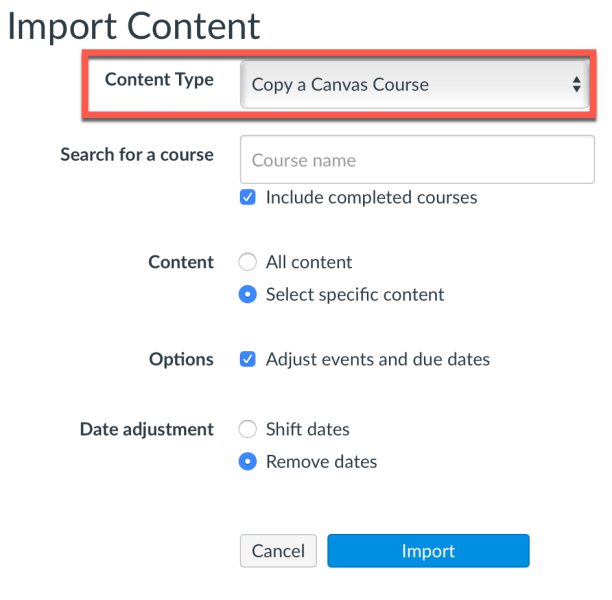
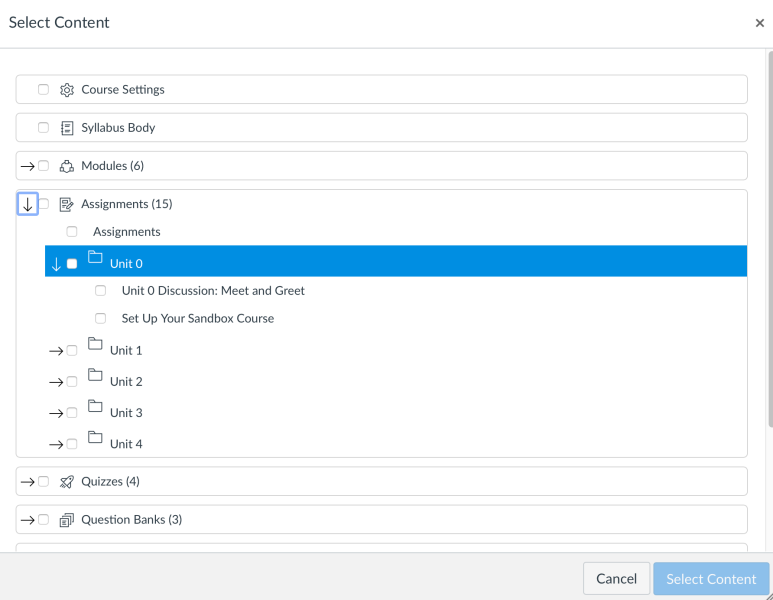
  • Import Blackboard content from within a Canvas migrated course into a new Canvas course
  • Begin linking files and other content to pages and modules within your Canvas course

The first workshop for Canvasing Your Migrated Blackboard Course will be held on Tuesday, August 14 from 10 to 11am. Please note that we recommend that you attend one of eLearning’s Canvas 101 workshops before you continue building your courses in Canvas.

Please refer to the Upcoming Workshops post in this eLearning blog (http://blogs.mtu.edu/elearning) for information and date/times for all Canvas workshops, which are taught by eLearning instructors Tom Freeman, Jeff Toorongian and Jeannie DeClerck. To register for workshops, send an email to elearning@mtu.edu with the workshop topic/date of interest.

Important Information about Final Grade Submission via Canvas

Monday, April 16th, 2012

Important Information about Final Grade Submission via Canvas:

ATTENTION INSTRUCTORS:

If you plan to submit Final grades for your students in Canvas there are some important instructions you will need to follow.  This information is available in your Canvas Support Resources course.  You will find the information by clicking on the Electronic Grade Submission from Canvas (from eLearning) link.

If you do not see the Canvas Support Resources course in your course listing please contact eLearning.

eLearning
email: elearning@mtu.edu
phone: 487-3000

eLearning Announces Additional Canvas Workshops

Wednesday, February 22nd, 2012

eLearning is offering additional introductory and new advanced Canvas workshops which will be taught by Tom Freeman, Jeff Toorongian and Jeannie DeClerck and are held in the Library’s instruction rooms (second floor, near the bridge).

Please find below the upcoming schedule and workshop descriptions. All workshops are taught by Tom Freeman, Jeff Toorongian and Jeannie DeClerck and are held in the library’s Instruction Rooms (second floor, near bridge). Additional workshops will be announced later.

To register or for further information, please contact eLearning staff at elearning@mtu.edu.

Upcoming Workshops:

Canvas 101: Introduction to Canvas          Thursday, Feb. 23 at 10:00 a.m.
Canvas 101: Introduction to Canvas          Wednesday, Feb. 29 at 2:00 p.m.
Assignments & Grade Book in Canvas      Tuesday, Mar. 13 at 2:00 p.m.
Pages, Modules and Files in Canvas         Wednesday, Mar. 14 at 2:00 p.m.
Basic Quizzes in Canvas                            Wednesday, Mar. 21 at 10:00 a.m.
Canvas 101: Introduction to Canvas          Thursday, Mar. 22 at 10:00 a.m.
Assignments & Grade Book in Canvas      Wednesday, Mar. 28 at 10:00 a.m.
Pages, Modules and Files in Canvas          Thursday, Mar. 29 at 10:00 a.m.
Canvas 101: Introduction to Canvas          Wednesday, Apr. 4 at 2:00 p.m.
Basic Quizzes in Canvas                             Tuesday, Apr. 3 at 2:00 p.m.

William G. Jackson Center for Teaching and Learning

219 Van Pelt & Opie Library
1400 Townsend Drive
Houghton, MI 49931

Ph. 906-487-2046
Email: ctl@mtu.edu

Michigan Technological University

1400 Townsend Drive
Houghton, Michigan 49931-1295
906-487-1885

See a Problem?

Email the Webmaster

Protected by Akismet | Blog with WordPress