Category: CTL

CFE Newsletter: Campus Partner Submission Guidelines

The Center for Faculty Excellence (CFE) publishes a newsletter every other Wednesday to share information, opportunities, events, resources, and services relevant to Michigan Tech faculty.

Who Receives the Newsletter?

  • Michigan Tech active faculty
  • Deans
  • Department chairs
  • Department coordinators
  • Academic administrators
  • Other Michigan Tech employees who request to be added to the distribution list


The primary audience is Michigan Tech faculty, but other members of the university community may subscribe when the information is relevant to their work or interests.  To subscribe, please send an email to jelhendr@mtu.edu and you will be added to the list!

What Can Be Submitted?

Campus partners are welcome to submit faculty development and support focused content for consideration in the CFE newsletter, including:

  • Articles and announcements: Submitted articles and announcements will be considered for inclusion in the CFE newsletter. Articles may also be considered for publication on the CFE Blog.
  • Events: Workshops, presentations, training, professional development, and other events relevant to faculty.
  • Faculty services and opportunities: Resources, programs, consultations, initiatives, professional opportunities, and other faculty-focused offerings.


How to Submit

Submit your complete, publication-ready content by email to jelhendr@mtu.edu.

Please include all necessary:

  • Final text
  • Event details and registration information, when applicable
  • Links
  • Graphics or images
  • Other materials needed for publication


Campus partners are responsible for obtaining any required organizational or departmental approval before submitting content. CFE staff will not develop content or create graphics on behalf of submitting partners.

Publication Schedule and Deadlines

The newsletter is published every other Wednesday. For an item to be considered for a specific issue, complete content should be submitted by 5:00 p.m. on the preceding Friday.

Newsletter Publication Date Submission Deadline
Wednesday, September 9, 2026 Friday, September 4, 2026
Wednesday, September 23, 2026 Friday, September 18, 2026
Wednesday, October 7, 2026 Friday, October 2, 2026
Wednesday, October 21, 2026 Friday, October 16, 2026

Note: The CFE publication schedule may be adjusted around university holidays and academic breaks. Additional publication dates will be provided as the calendar is finalized.

Late submissions may be included as time allows, but inclusion in a particular newsletter is not guaranteed.

Additional CFE Promotion

Events

Events submitted to the CFE for newsletter consideration will also be added to the CFE website event listing and the CFE event publication, which is released every other week in Tech Today during the off week between newsletters.

If you do not want an event included in the CFE website event listing or event publication, please indicate this when submitting it.

CFE Blog

Articles submitted for the newsletter may also be considered for publication on the CFE Blog.

CFE partners are responsible for providing the complete article and accompanying materials. CFE staff will prepare and publish partner articles selected for the blog.

Review and Publication

All submitted content is subject to CFE review. Submission does not guarantee publication.

The CFE may edit content for clarity, length, accessibility, or formatting; determine the most appropriate publication channel; defer content to a future issue; or decline content that does not align with the CFE’s audience or mission.

The CFE determines final placement and publication timing.

Quick Reminder

Submit complete content by Friday at 5:00 p.m. → CFE reviews and prepares content → Newsletter publishes every other Wednesday.

For questions or submissions, contact jelhendr@mtu.edu.

Welcoming Michigan Tech’s Newest Faculty

Four days of orientation help new faculty connect with the university, prepare for the classroom, explore research opportunities, and begin building their Michigan Tech community.


Every academic year brings new people, new ideas, and new energy to Michigan Technological University. This week, Michigan Tech welcomed 17 new faculty members and 4 Research Assistant Professors to the University.

New Faculty Orientation, held this year August 17-20 is designed to help new colleagues get acquainted with the university, understand the resources available to them, and begin building connections that will support them throughout their careers at Michigan Tech.

Getting to Know Michigan Tech

The week began with Human Resources orientation, helping new faculty navigate the practical information and responsibilities that come with joining the university.

Tuesday shifted the focus to the broader Michigan Tech community. New faculty heard from President Richard Koubek and Provost and Senior Vice President for Academic Affairs Andrew Storer before exploring topics ranging from faculty responsibilities and university resources to student support, teaching and learning, graduate education, promotion and review, and early-career mentoring.

The goal isn’t simply to give new faculty a list of offices and policies to remember. It’s to help them begin to understand how Michigan Tech works—and, perhaps more importantly, who is here to help them along the way.

Preparing for the Classroom

Wednesday brought the new faculty together for a teaching-focused workshop organized by the Center for Faculty Excellence.

The afternoon session provided practical preparation for the work of teaching at Michigan Tech, with sessions covering technology-enhanced teaching and learning, the Testing Center, accessible course content, course design, and preparing for the first day of class.

The final session, “How to Have a Great First Day!” was presented by Distinguished Teaching Award winner Zack Fredin, ending the day with a focus on  the experience that will soon be shared by every new faculty member: standing in front of a classroom full of Michigan Tech students for the first time.

Together, the sessions offered new faculty both the tools and the perspective they need to begin creating meaningful learning experiences for their students.

Discovering the Research Community

Thursday focused on another important part of life at Michigan Tech: research and scholarship.

New faculty were introduced to Michigan Tech’s research enterprise and the many people and offices involved in supporting research, from research development and sponsored programs to research security, integrity, and facilities. A proposal submission session provided an introduction to the process of developing and submitting research proposals at Michigan Tech.

And then came the Tech Talks.

Two Slides. Two Minutes. A Lot to Share.

For the new faculty members engaged in research and scholarship, Tech Talks offered a chance to introduce their work to the broader Michigan Tech community.

The challenge is simple—but not necessarily easy: two slides and two minutes.

Rather than providing an in-depth research presentation for specialists in their fields, the new researchers were asked to give the campus community a high-level overview of their work that could be understood by people from across the university.

The result is a rapid-fire introduction to the research interests, expertise, and ideas that Michigan Tech’s newest researchers are bringing to campus.

The Tech Talks also serve a purpose beyond the event itself. A compiled version of the presentations will be shared with the campus community, giving faculty, staff, and others an opportunity to discover the research taking place across disciplines—and perhaps find a future collaborator.

Following the Tech Talks, the new faculty gathered for a President’s Reception, providing an opportunity to relax, celebrate the completion of the initial orientation, and continue getting to know their new colleagues and members of the university community.

The Welcome Continues

Welcoming new faculty is not just a four-day activity. Throughout the fall semester, new faculty will continue to meet weekly on Wednesdays from 3–4 p.m. as part of Michigan Tech’s Extended New Faculty Orientation. These sessions provide additional opportunities to explore topics relevant to faculty life, teaching, research, and professional development while continuing to build connections with colleagues.

That continued connection is an important part of the orientation experience. Starting a new faculty position means learning much more than a new campus, a new course schedule, or a new set of university policies. It means becoming part of a community.

And that community includes all of us.

As you meet Michigan Tech’s newest faculty members—in classrooms, laboratories, offices, committees, events, and around campus—take a moment to introduce yourself. Invite a new colleague to lunch. Point someone toward a resource. Say hello at an event.

A simple welcome can make a difference.

We are excited to welcome Michigan Tech’s newest faculty members and look forward to seeing the ideas, teaching, research, and contributions they will bring to our university.

Welcome to Michigan Tech!

New Canvas Course Readiness Guide Available

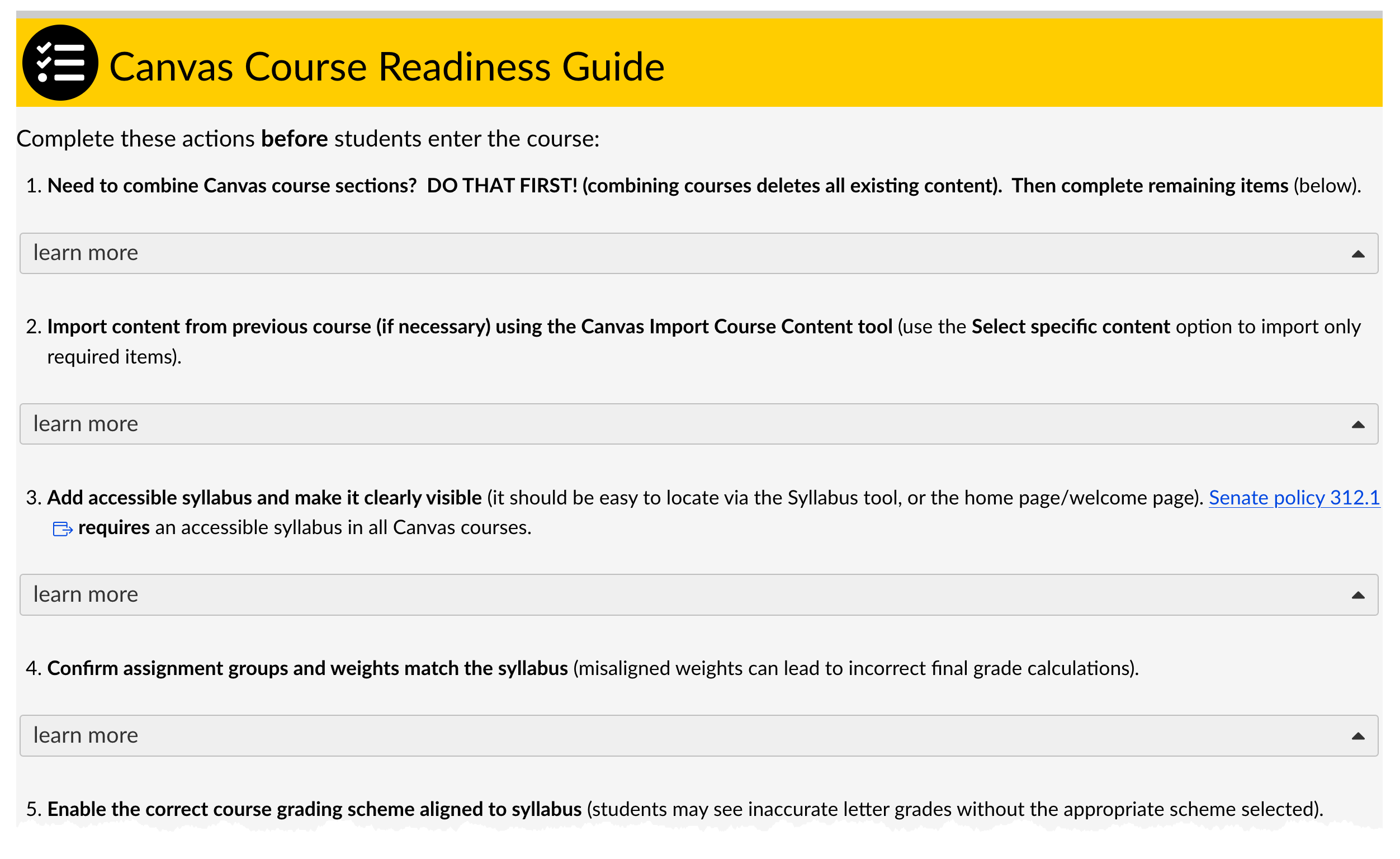
As you prepare your Canvas courses for the fall semester, a new resource is available to help make sure your course is ready for students. The Michigan Tech Canvas Course Readiness Guide is now included in all Canvas course shells and provides a practical checklist of items to review before the semester begins, along with additional recommendations for maintaining your course throughout the term.

The guide is designed to help instructors catch common Canvas setup issues before they create confusion for students. The initial Course Readiness section focuses on the most important tasks to complete before students enter the course. These include importing content from a previous course, adding an accessible syllabus, checking assignment groups and grading schemes, organizing course navigation, publishing essential Week 1 content, and using Student View to make sure students can see and access what you expect.

The guide also calls attention to a few easily overlooked Canvas details that can have a significant impact on students. For example, courses must be published before students can access course content or receive Canvas announcements. Instructors using Course Access Materials should also confirm that the appropriate navigation link is visible and that the correct materials are available.

Beyond the start of the semester, the Comprehensive Course Maintenance section provides additional suggestions to consider as you build and manage your course throughout the term. Topics include gradebook settings, assignment and availability dates, module organization, communication practices, Huskycast video access, and assignments connected through external tools such as Gradescope or publisher platforms.

Each section also includes links to relevant Canvas Guides and Michigan Tech resources, making it easy to find additional instructions when you need them.

As you prepare your fall courses, take a few minutes to review the Canvas Course Readiness Guide available in your course shell. A short check now can help prevent common problems once students arrive and help provide students with a smoother start to the semester.

Questions about Canvas or course setup? Contact the CFE support team at elearning@mtu.edu for assistance.

How may I best help you?

The beginning of the semester can bring a lot of stress and be overwhelming! To better help you and be available for teaching technology and application consults, starting in the Fall ’25 term I rolled out a Consult Calendar to schedule a time to consult with me which can either be in-person (in a classroom or our CTL office suite) or through Zoom.

An additional way to contact me is to email elearning@mtu.edu with as much information as possible about your issue and I’ll get back to you as soon as I can!

As well, a new Introduction to Tech Teaching Tools – The Basics Canvas course has been created! This Canvas course covers the basics of Canvas and is self-enrolled; the course will eventually contain content for teaching applications supported by the CTL.

Thank you and have a great Spring ’26 semester!

– Sully

A Brief Look at the Accessible Tech Challenge

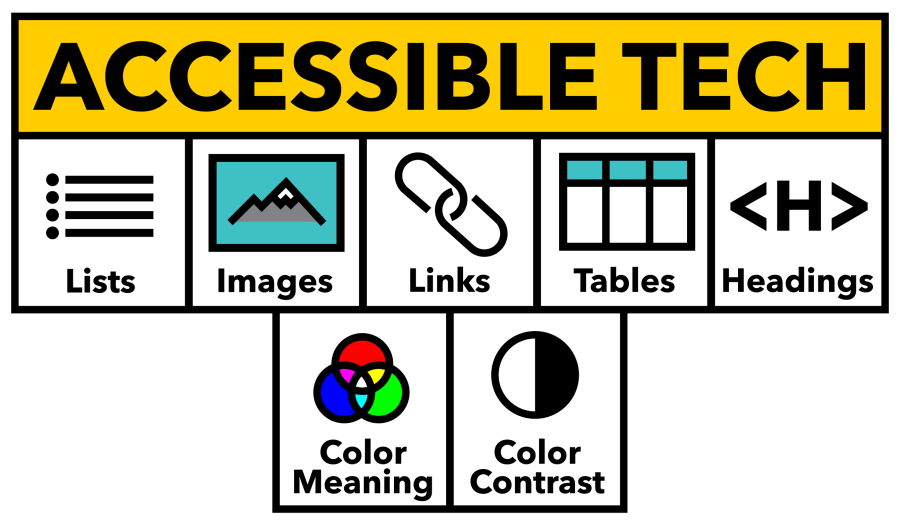
The Accessible Tech Logo

As we return to Michigan Tech for the Spring semester, the Center for Teaching and Learning would like to invite you to our newest program: The Accessible Tech Challenge.

The CTL has been focusing recently on ways to increase accessibility in online courses to ensure that every Husky has the best opportunity possible as they take on new courses. In addition, upcoming changes to the ADA Title II web accessibility rule are making accessibility in online instruction more important than ever before. To help you navigate the challenges of online accessibility and create a community of practice around overcoming these challenges, the CTL has created the Accessible Tech Challenge.

The challenge, simply put, is to get the Ally score of one of your classes above 85% before April 13th, 2026. It can be any course shell, if it is active in the Spring 2026 semester. And what is a challenge without a reward? If you meet that 85% threshold for your course, then you win a Yeti travel mug, branded with the official Accessible Tech Challenge logo. Plus bragging rights, and the satisfaction of knowing that your course is better prepared for all of our students.

From January 15th, through April 1st, we will be hosting a series of events to support you in this challenge. Every 2 weeks we will cover a topic to help you, using our “5+2” roadmap to accessibility. This gives you 2 weeks to address each of these issues at your own pace, and on your own schedule, improving your accessibility without an overwhelming sprint. Please note that attendance to these sessions is not mandatory for participation or winning. All you have to do is sign up and put in the work. These sessions are here to let you share tips with other faculty members, get support from your accessibility experts in the CTL, and to provide a scheduled time to focus on the objectives.

The event schedule is as follows:

  • January 15: Kickoff Lunch and Learn (how to tidy up course shells to improve Ally score, how to view your Ally Accessibility Report, and an introduction to the Challenge).
  • January 28: Headings Working Session
  • February 10: Image Descriptions Working Session
  • February 25: Tables Working Session
  • March 17: Lists and Links Working Session
  • April 1: Color Working Session
  • April 17: CTL Open House (prize handout and come meet with CTL members about your course while you grab a snack!)

You can use our sign-up form to apply for the challenge, and register for the Lunch and Learn via LibCal. We look forward to seeing you there! If you have any questions about the challenge, please reach out to the CTL.

CTL Accessible Tech Challenge: Working Sessions

Join us for an Accessible Tech Challenge Working Session, a practical, hands-on opportunity to strengthen the accessibility of your digital course materials. Each session focuses on one key skill area, explains why it matters for students, and gives you dedicated time to work on your own content and get real-time guidance from campus digital accessibility experts.


For All Sessions:

Where: Library Room 243

Time: 2:00 p.m. to 3:00 p.m. (CTL staff will be available from 3:00 p.m. to 4:00 p.m. to continue working with individual attendees)

Accommodation requests can be made on the registration screen, by emailing ctl@mtu.edu, or by calling (906) 487-3000.


Topic for January 28th:  Headings

Clear, consistent headings help students understand the structure of your content and make navigation more efficient for assistive technology users. In this session, you’ll learn how to apply proper heading levels in Canvas and document editors to create materials that are easier to navigate and more usable for all learners.  
Register today to reserve your spot https://mtu.libcal.com/event/15778874 and bring your laptop to work on content you’d like to improve.

Topic for February 10th:  Image Descriptions

Alternative text provides essential access for students who need help interpreting the meaning of course images due to a disability or technical limitation.  This session guides you through writing effective descriptions for photos, charts, diagrams, and other course visuals, with examples and tips for different image types.  
Register today to reserve your spot https://mtu.libcal.com/event/15778925 and bring your laptop to work on content you’d like to improve.

Topic for February 25th:  Tables

Well-structured tables help students grasp relationships in your content and ensure that assistive technology can interpret the information accurately. In this session you’ll learn how to create accessible tables by adding captions, headers, and scope attributes that support learning for all your students.  
Register today to reserve your spot https://mtu.libcal.com/event/15778946 and bring your laptop to work on content you’d like to improve.

Topic for March 17th:  Color

Color choice directly affects readability, contrast, and the ability of all students—including those with low vision or color vision deficiency—to interpret course materials. This session will cover how to choose accessible colors, avoid color-only meaning cues, and use free software tools to ensure accessibility and usability. Register today to reserve your spot https://mtu.libcal.com/event/15837615 and bring your laptop to work on content you’d like to improve.

Topic for April 1st:  Lists and Links

Properly structured lists and descriptive hyperlinks make your content easier to navigate and understand, especially for students using assistive technology. In this session, you’ll explore how to create semantic lists and write descriptive link text that effectively communicates destination and intent. 

Register today to reserve your spot https://mtu.libcal.com/event/15778956 and bring your laptop to work on content you’d like to improve.

CTL Accessible Tech Challenge Kick-Off Lunch & Learn

When: January 15, 12:00-1:00

Where: MUB

Join the CTL’s accessibility team as we launch the Spring 2026 Accessible Tech Challenge—a supportive and friendly competition designed to help instructors improve the accessibility and usability of their course materials.

This kick-off luncheon will introduce the challenge structure, outline the accessibility target for participants, and share strategies to help you make steady progress throughout the semester. We’ll also demonstrate how to use Canvas tools to locate outdated or unused content and review the Ally accessibility report to help you identify, prioritize, and address accessibility issues efficiently.

To support continued momentum, we’ll be hosting bi-weekly working sessions throughout the semester, each focused on a specific accessibility topic such as headings, image descriptions, tables, color contrast, and links and lists. These sessions will offer hands-on help so you can work directly on your own course materials with guidance from the CTL team.

All instructors who reach the challenge’s accessibility target will receive a nice prize as a thank-you for helping ensure students can access course materials in ways that work for them.

Whether you’re just getting started or refining existing content, the Accessible Tech Challenge provides community, accountability, and practical tools to help you make meaningful progress.

Register at: https://mtu.libcal.com/event/15572338Accommodation requests can be made on the registration screen, by emailing ctl@mtu.edu, or by calling (906) 487-3000.

Pearson homework platform notice – Scheduled Maintenance Work


IMPORTANT NOTICE TO INSTRUCTORS FROM PEARSON:

October 18, 2025 maintenance information

On Saturday, October 18, 2025 from 1:00am to 9:00am ET the following products will be unavailable:

· Mastering / Modified Mastering courses: You and your students will be unable to access Mastering courses for the entire maintenance window. This includes those courses integrated with an LMS.

· Students will not be able to register for or enroll in any of these courses.

· Instructors will be unable to create new or copy existing courses.

· A maintenance notification will appear at login or when users try to access these courses.

· Revel: You and your students will be unable to access your Revel courses for the entire maintenance window. This impacts all courses, including those integrated with learning management systems like Blackboard, Canvas, Brightspace by D2L, and Moodle.

· Students will not be able to register for or enroll in any Revel courses.

· Instructors will be unable to create new or copy existing Revel courses.

· A maintenance notification will appear at login or when users try to access these courses.

· Content downloaded to the mobile app before maintenance starts will be available.

· Learning Catalytics: You and your students will be unable to access this tool during the maintenance window.

The following products will remain as available, however customers may experience disruptions during the maintenance window due to infrastructure maintenance:

· XL MyLab, MathXL for School, and Mastering Platform Update coursesYou and your students will be able to access XL MyLab, MathXL for School, and Mastering Platform Update courses for the entire maintenance window.

o IMPORTANT NOTE: Mastering Platform Update instructors may experience assignment copy and course copy issues during the maintenance window.

· Pearson+: Customers will be able to access Pearson+ for the entire maintenance window. A maintenance notification will appear at login.

· StatCrunch: You and your students will be able to access this tool during the maintenance window.

· IMPORTANT NOTE: While these products will remain available, customers may still experience disruptions during the maintenance window due to infrastructure maintenance. Please avoid any critical assessment activity during this Maintenance.

Building An Interactive Online Course Using DesignPLUS

Looking to make your online course more interactive and engaging? Join us for a hands-on workshop to learn how to use DesignPLUS to build an interactive online course. We’ll show you practical strategies and guide you through follow-along activities so you can start using these tools right away! Just be sure to bring your laptop.

When: Wednesday, September 3, 2025

Time: 10:00 a.m. – 11:00 a.m.

Location:  Van Pelt/Opie Library Room 243
Registration is required.

2025 CTL Instructional Awards Announced

The Jackson Center for Teaching and Learning (CTL) congratulates the following 2025 Deans’ Teaching Showcase members who have been selected to receive 2025 CTL Instructional Awards.  

  • Innovative or Out of Class Teaching: Paul Goetsch (Biological Sciences)
  • Large Class Teaching: Shane Oberloier (Electrical and Computer Engineering)
  • Curriculum Development and Assessment: Laura Kasson Fiss (Pavlis Honors College, Humanities)

This year’s recipients will share brief presentations on the work that earned them their teaching awards at a CTL Lunch and Learn event on Tuesday, September 9, at 12:00 PM in the MUB Ballroom. Each will receive formal recognition and a cash award. 

Please register in advance to attend the luncheon.

The CTL would also like to thank previous instructional award recipients who were instrumental in the selection process.

We’re looking for nominations for the 2026 Deans’ Teaching Showcase during spring semester. Please consider suggesting (to your dean or chair) instructors who have made exceptional contributions in curriculum development, assessment, innovative or out-of-class teaching, or large class teaching.

Contact the CTL (ctl@mtu.edu) for more information or to request accommodations for meal attendance.