Tag: CTL

CTL Accessible Tech Challenge: Working Sessions

Join us for an Accessible Tech Challenge Working Session, a practical, hands-on opportunity to strengthen the accessibility of your digital course materials. Each session focuses on one key skill area, explains why it matters for students, and gives you dedicated time to work on your own content and get real-time guidance from campus digital accessibility experts.


For All Sessions:

Where: Library Room 243

Time: 2:00 p.m. to 3:00 p.m. (CTL staff will be available from 3:00 p.m. to 4:00 p.m. to continue working with individual attendees)

Accommodation requests can be made on the registration screen, by emailing ctl@mtu.edu, or by calling (906) 487-3000.


Topic for January 28th:  Headings

Clear, consistent headings help students understand the structure of your content and make navigation more efficient for assistive technology users. In this session, you’ll learn how to apply proper heading levels in Canvas and document editors to create materials that are easier to navigate and more usable for all learners.  
Register today to reserve your spot https://mtu.libcal.com/event/15778874 and bring your laptop to work on content you’d like to improve.

Topic for February 10th:  Image Descriptions

Alternative text provides essential access for students who need help interpreting the meaning of course images due to a disability or technical limitation.  This session guides you through writing effective descriptions for photos, charts, diagrams, and other course visuals, with examples and tips for different image types.  
Register today to reserve your spot https://mtu.libcal.com/event/15778925 and bring your laptop to work on content you’d like to improve.

Topic for February 25th:  Tables

Well-structured tables help students grasp relationships in your content and ensure that assistive technology can interpret the information accurately. In this session you’ll learn how to create accessible tables by adding captions, headers, and scope attributes that support learning for all your students.  
Register today to reserve your spot https://mtu.libcal.com/event/15778946 and bring your laptop to work on content you’d like to improve.

Topic for March 17th:  Color

Color choice directly affects readability, contrast, and the ability of all students—including those with low vision or color vision deficiency—to interpret course materials. This session will cover how to choose accessible colors, avoid color-only meaning cues, and use free software tools to ensure accessibility and usability. Register today to reserve your spot https://mtu.libcal.com/event/15837615 and bring your laptop to work on content you’d like to improve.

Topic for April 1st:  Lists and Links

Properly structured lists and descriptive hyperlinks make your content easier to navigate and understand, especially for students using assistive technology. In this session, you’ll explore how to create semantic lists and write descriptive link text that effectively communicates destination and intent. 

Register today to reserve your spot https://mtu.libcal.com/event/15778956 and bring your laptop to work on content you’d like to improve.

CTL Accessible Tech Challenge Kick-Off Lunch & Learn

When: January 15, 12:00-1:00

Where: MUB

Join the CTL’s accessibility team as we launch the Spring 2026 Accessible Tech Challenge—a supportive and friendly competition designed to help instructors improve the accessibility and usability of their course materials.

This kick-off luncheon will introduce the challenge structure, outline the accessibility target for participants, and share strategies to help you make steady progress throughout the semester. We’ll also demonstrate how to use Canvas tools to locate outdated or unused content and review the Ally accessibility report to help you identify, prioritize, and address accessibility issues efficiently.

To support continued momentum, we’ll be hosting bi-weekly working sessions throughout the semester, each focused on a specific accessibility topic such as headings, image descriptions, tables, color contrast, and links and lists. These sessions will offer hands-on help so you can work directly on your own course materials with guidance from the CTL team.

All instructors who reach the challenge’s accessibility target will receive a nice prize as a thank-you for helping ensure students can access course materials in ways that work for them.

Whether you’re just getting started or refining existing content, the Accessible Tech Challenge provides community, accountability, and practical tools to help you make meaningful progress.

Register at: https://mtu.libcal.com/event/15572338Accommodation requests can be made on the registration screen, by emailing ctl@mtu.edu, or by calling (906) 487-3000.

How may I best help you?

The beginning of the semester can bring a lot of stress and be overwhelming! To better help you and be available for teaching technology and application consults, starting Fall ’25 term I am rolling out a Consult Calendar to schedule a time to consult with me which can either be in-person (in a classroom or our CTL office suite) or through Zoom.

An additional way to contact me is to email elearning@mtu.edu with as much information as possible about your issue and I’ll get back to you as soon as I can!

As well, a new Introduction to Tech Teaching Tools – The Basics Canvas course has been created! This Canvas course covers the basics of Canvas and is self-enrolled; the course will eventually contain content for teaching applications supported by the CTL.

Thank you and have a great Fall ’25 semester!

– Sully

Building An Interactive Online Course Using DesignPLUS

Looking to make your online course more interactive and engaging? Join us for a hands-on workshop to learn how to use DesignPLUS to build an interactive online course. We’ll show you practical strategies and guide you through follow-along activities so you can start using these tools right away! Just be sure to bring your laptop.

When: Wednesday, September 3, 2025

Time: 10:00 a.m. – 11:00 a.m.

Location:  Van Pelt/Opie Library Room 243
Registration is required.

2025 CTL Instructional Awards Announced

The Jackson Center for Teaching and Learning (CTL) congratulates the following 2025 Deans’ Teaching Showcase members who have been selected to receive 2025 CTL Instructional Awards.  

  • Innovative or Out of Class Teaching: Paul Goetsch (Biological Sciences)
  • Large Class Teaching: Shane Oberloier (Electrical and Computer Engineering)
  • Curriculum Development and Assessment: Laura Kasson Fiss (Pavlis Honors College, Humanities)

This year’s recipients will share brief presentations on the work that earned them their teaching awards at a CTL Lunch and Learn event on Tuesday, September 9, at 12:00 PM in the MUB Ballroom. Each will receive formal recognition and a cash award. 

Please register in advance to attend the luncheon.

The CTL would also like to thank previous instructional award recipients who were instrumental in the selection process.

We’re looking for nominations for the 2026 Deans’ Teaching Showcase during spring semester. Please consider suggesting (to your dean or chair) instructors who have made exceptional contributions in curriculum development, assessment, innovative or out-of-class teaching, or large class teaching.

Contact the CTL (ctl@mtu.edu) for more information or to request accommodations for meal attendance.

Coffee Chats with the CTL – Connect, Share, Inspire

Take a break and join the William G. Jackson Center for Teaching and Learning (CTL) Thursday Sept. 4th from 3:30–4:30 p.m. in Library 243 for our biweekly Coffee Chats!

Enjoy a complimentary beverage from Velodrome as you connect with colleagues from across campus in a relaxed, informal setting. These sessions offer an open space to:

  • Share teaching ideas
  • Learn from one another
  • Collaborate and build community

No agenda. No presentations. Just rich conversation and meaningful connections.

              September 4th Topic: Tips and Tricks for a Great Semester!

We’ll kick off the series by sharing strategies, tools and insights to help set the tone for a successful and engaging semester!

Come as you are—whether you’re looking for inspiration, support, or simply a warm drink and good company. We’d love to see you there!

CTL Kickoff Coffee Chat – Building Communities of Practice

Hosted by the William G. Jackson Center for Teaching and Learning (CTL)
Tuesday, August 19
| 10 a.m.-11 a.m.Outside of Velodrome -look for the orange conversation flag!

Start the semester with a warm beverage and a fresh perspective on teaching!

Join us for a special kickoff event to launch our Fall Coffee Chat series. This session will introduce the concept of Communities of Practice—informal, supportive groups where educators can connect, collaborate, and grow together.

What to Expect:

  •  A complimentary beverage from Velodrome
  • A pre-reflection activity to spark ideas and self-discovery
  • Opportunities to find like-minded colleagues and shared teaching interests
  •  A preview of the Fall Coffee Chat schedule—both formal and informal sessions
  •  Highlights of other CTL events and offerings this semester

Whether you’re new to teaching or a seasoned educator, this is a great chance to connect, reflect, and kick off the semester with energy and community.

No RSVP needed—just bring your curiosity and your coffee cup!

Respondus Monitor – Show Your Work

The Show Your Work feature in Respondus Monitor makes it easy for students to upload photos of their handwritten work at the end of an online exam. There are no folders to create, no PDFs to generate, no filename conventions to follow – in short, no hassles.

Show Your Work will prompt students to take a photo of their calculations, worksheets, diagrams, drawings, doodles – whatever you require – at the end of the exam.

Here’s how it works:

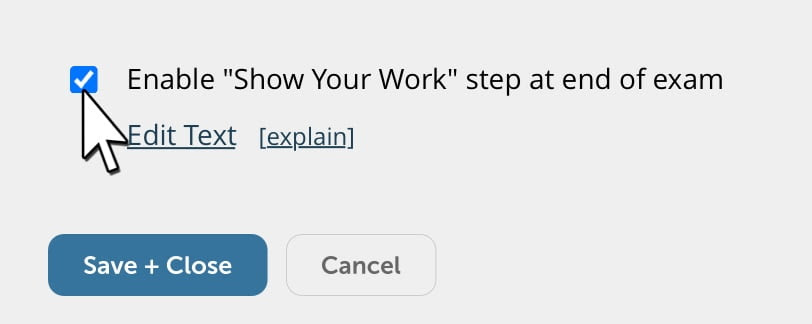
Show Your Work is enabled by the instructor from the Respondus Monitor settings (under Advanced Settings). The default instructions for students can be edited too.
Students take photos of their written work (up to 20) immediately after the exam is completed.
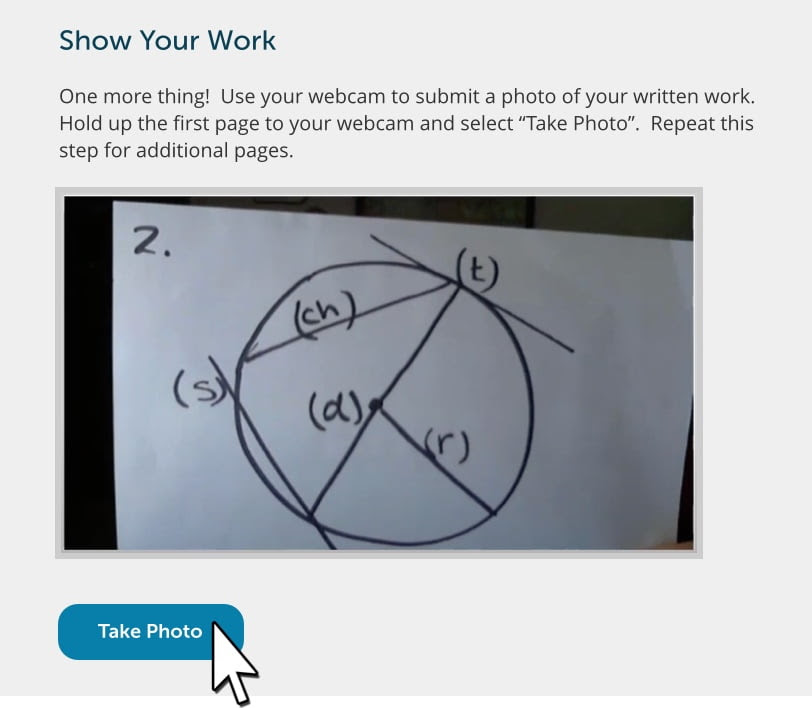
These photos appear in the top row of the proctoring results for the student. Click an image to view a large, high-resolution image of it.

Learn More:

To learn more about Respondus Monitor’s Show Your Work feature in this video.
CTL Services

CTL Services
Ever wonder how the Center for Teaching and Learning can support your instructional needs? We are here with support for any questions you may have about Canvas, Huskycast, Gradescope, Turnitin, Zoom, or iClicker. Already familiar with these but would like to take a deeper dive into some of these technologies or maybe you have never used these and would like to give them a try in your classroom, we would be happy to provide some one-to-one training! Feel free to drop by during our walk-in hours from 10-noon and 1-4pm Monday through Friday. We can also provide in-person consultations in classrooms for classroom teaching technologies. No time to stop by the CTL? Be sure to check out our online resources that can be found on our site in our Teaching and Learning Knowledge Base, Canvas Instructor Guides, and the Getting Started With Canvas sections.

Are you interested in taking a deeper dive into a specific instructional topic? We also have a periodical library available for checkout covering a wide range of topics! Feel free to stop in anytime and review the collection.


Points of interest!
iClicker Cloud – Reminding you that iClicker Classic was retired at the end of 2023 and iClicker Cloud will be the only supported polling software. The student experience will not change and students can still use either physical iClicker remotes or the mobile/web app, though iClicker bases are not in all classrooms. iClicker hardware – student remotes, instructor remotes, and bases – as well as the student mobile app will continue to be supported in iClicker Cloud. Visit the Center for Teaching and Learning’s iClicker resource page to get started using iClicker and for more information on transitioning to iClicker Cloud visit iClicker’s online resource page.

iClicker Groups (Beta) – iClicker Groups is in Beta, a new method of engaging your students with polling: promote discussion, open new lines of communication, and encourage collaboration. Utilizing this part of the iClicker suite divides your participants in groups to work on building a consensus for your polling. You can find the instructor guide at iClicker Groups (Beta).

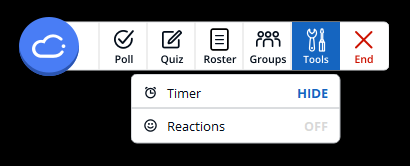
New to iClicker Cloud – With version 7 Tools was introduced to the iClicker Cloud application. The poll taker is able to have a separated clock from the polling menu as well as at a future point be able to enable emoji reactions for poll takers.

If you have any questions or would like to know more, visit the iClicker Groups Instructor FAQ or contact us at the Center for Teaching and Learning for more information.

Feel free to contact us at 7-3000 or email us at elearning@mtu.edu.

CTL and IDEAhub Lunch and Learn

Date: Tuesday, January 28, 2025

Time: 12:00pm – 1:00pm

Location: Memorial Union – Ballroom A

Registration is required.

Join IDEAhub leadership and participants from IDEAhub’s summer course redesign workshop. Find inspiration in faculty stories about their “small bite” course innovations and learn more about how to “level up” your teaching using IDEAhub tools for innovation.

To register please visit: https://mtu.libcal.com/event/13801954

For questions or request any accommodations, please contact the CTL at (906) 487-2275 or ctl@mtu.edu.