Search Results for "thesis and dissertations MS Office tips"

Seminar on Competitive Fellowships

Many federal agencies solicit highly competitive graduate fellowship/scholarship applications. In particular, Michigan Tech students have had success with the following:

The Sponsored Program Enhancement office is offering a series of seminars/workshops to help eligible domestic first-year graduate students and senior undergraduate students understand what opportunities are available and help them develop a competitive application.

  • Overview of Funding Opportunities
    Sept. 8, 4 to 5 p.m., Memorial Union Peninsula Room
  • Writing the Personal Essay and References
    Sept. 15, noon to 1 p.m., Memorial Union Peninsula Room
  • Tips from Real Panel Reviewers
    Sept. 22, noon to 1 p.m., Memorial Union Ballroom B3
  • Writing Research Essays
    Sept. 6, 4 to 5 p.m., Memorial Union Peninsula Room
  • Peer Review Workshop
    Sept. 13, 4 to 5 p.m., Memorial Union Peninsula Room
  • Peer Review Workshop
    Sept. 20, noon to 1 p.m., Memorial Union Ballroom A2

For more information, contact Jodi Lehman at jglehman@mtu.edu .

Formatting Assistance Sessions for Spring 2016

Are you working on formatting corrections for your dissertation, thesis, or report? Do you need help? Join Harriet King (gscap@mtu.edu), coordinator of the Graduate School Communications Assistance Program for group work hours. These workshops are provided at no charge to students working on a dissertation, thesis, or report. Harriet is skilled with MS Office, Open Office, and Adobe Acrobat Pro. These rooms are equipped with PCs with University software, or you may bring your own laptop. If you need additional help or prefer one-on-one assistance, please contact Harriet to arrange for times and inquire about the services available.

All workshops will be held in Dillman 213 at the following times:

  • Friday, April 8, 2016: 9am – noon
  • Sunday, April 10, 2016: 2-5pm
  • **cancelled** Thursday, April 21, 2016
  • **added** Sunday, April 24, 2016: 2-5pm
  • Thursday, April 28, 2016: 9am – noon

Formatting Assistance for Summer 2016

Are you working on formatting corrections for your dissertation, thesis, or report? Do you need help? Join Harriet King (gscap@mtu.edu), coordinator of the Graduate School Communications Assistance Program for group work hours. These workshops are provided at no charge to students working on a dissertation, thesis, or report. Harriet is skilled with MS Office, Open Office, and Adobe Acrobat Pro. These rooms are equipped with PCs with University software, or you may bring your own laptop. Distance students may contact Harriet about remote assistance during these times via web conferencing.  If you need additional help outside of these times or prefer one-on-one assistance, please contact Harriet to arrange for times and pricing for the services available.

All workshops will be held in Dillman 213 from 1-4pm on the following dates:

  • Wednesday, July 27, 2016
  • Wednesday, August 3, 2016
  • Wednesday, August 10, 2016
  • Wednesday, August 17, 2016

How to use the Edit Text Tool

Adobe Acrobat has a Edit Text & Images Tool for content editing. This tool can be used to do minor text edits, such as deleting a small amount of text, or fixing a spelling mistake.

Open your pdf file, and select Edit Text & Images by clicking on “Tools” and selecting it from the “Content Editing” section as shown in the screen shot below.  If you use the tool a lot, right click on the tool to “Add to Quick Tools” and it will appear on your toolbar.

Maintain Your Lit Review, Maintain Your Sanity

A good literature review is one of the foundations of your thesis or dissertation.  Most students complete a thorough literature review as part of their Research proposal examination, but the final dissertation might be a year or more away in the future.

This article from the Gradhacker blog has some tips on how to keep your literature review up to date using technology to automate as much of the process as possible.  Learn how to:

  • Keep track of search terms
  • Use Google Reader to stay up to date
  • Use the media to stay current

Good News From The Graduate School – April 2026

All of us in the Graduate School are excited to assist you and help you succeed. Please check your email regularly for updates from the Graduate School. Be sure to visit the Graduate School Blog for updates, news, and funding opportunities.

Michigan Tech Experience


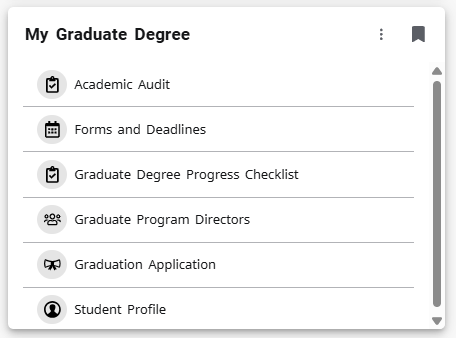
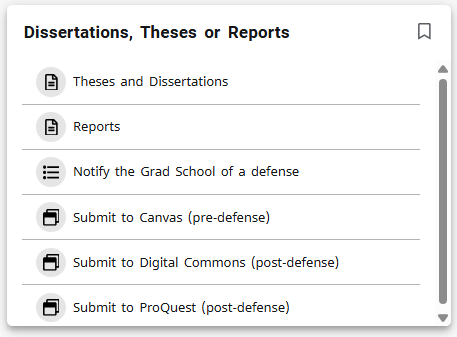
As the semester is quickly coming to a close, we encourage you to explore and bookmark the Experience page and make sure to save the “My Graduate Degree” card to your homepage (shown at right) for easy access and the “Dissertations, Theses or Report” card if you’re completing a research-based degree.

Things you will find on Experience:

  • Registration and Class Details
  • Forms and Deadlines
  • Academic Audit
  • Hold Information
  • Billing Information
  • Payroll and Direct Deposit Information

Make sure to bookmark your Degree Progress Checklist (or use the My Graduate Degree card in Experience to find it). It provides a helpful list of resources to support you as you complete your graduate degree.

Additional Resources

April Important Deadlines:

Deadline Date Description
April 13, 2026 – Last day to submit committee-approved post-defense dissertation, thesis, or report to the Graduate School for spring completion of degree.
April 13, 2026 – Submit all other degree completion paperwork (including applicable certificate degree schedules) to Graduate School—check your
 Degree Progress Checklist for items needed.
– Submit petition to enter candidacy to be eligible for candidacy for the next semester.
April 20, 2026 Deadline for KCP Future Faculty Fellowship applications.
April 29, 2026 Grace period for deadline for thesis, dissertation, or report.

Upcoming Events

Undergraduate Research & Scholarship Symposium
The Undergraduate Research & Scholarship Symposium will take place on Friday, March 27, 2026, from 1-3:30 p.m. in the Rozsa Center. This event showcases student-led research across disciplines and offers a great opportunity to explore innovative projects and engage with presenters. Graduate students are encouraged to attend to connect with undergraduate researchers in their areas of interest. Registration information will be available soon.

Let’s Talk with Student Mental Health and Well-Being
Stop by on Monday, April 6, 2026, from 1–3 p.m. in the Academic Office Building, Room 101 for a free, informal, and confidential conversation with an MTU counselor. This is a great opportunity to talk through any concerns, get support, or learn more about available mental health resources. All students are welcome.

Math Sciences Seminar Series – Brian Hopkins
Join the Math Sciences Seminar Series featuring Brian Hopkins on Friday, April 10, 2026, from 1-2 p.m. in Fisher Hall, Room 133. This seminar offers an opportunity to explore current topics and research in mathematics. All are welcome to attend.

Graduate Student Commencement Rehearsal
Graduating students are encouraged to attend the commencement rehearsal on Thursday, April 23, 2026, from 1–2 p.m. in the Multipurpose Room of the Student Development Complex (SDC). Please plan to arrive by 12:45 p.m. to prepare for the ceremony.

Graduate Student Commencement Ceremony The graduate student commencement ceremony is on Friday, April 24, 2026, at 3:00 p.m. in the John J. MacInnes Student Ice Arena of the Student Development Complex (SDC). Live streaming is available beginning on the morning of the ceremony.

Local Events

For ideas on how to spend your free time, be sure to check out the Local Area Events Calendar, there’s something for everyone. Check out the Rozsa website for on-campus events. To explore additional seminars, workshops, and Graduate School sponsored events, visit the MTU Events Calendar. This calendar highlights upcoming opportunities across campus, making it easy to stay informed and engaged throughout the semester!

Beyond the Classroom

The Graduate Student Government (GSG) is your key to connecting with the grad student community. They organize tons of activities, from professional development workshops and the Graduate Research Colloquium to social events and mixers. Getting involved with the GSG is a fantastic way to meet people from different departments, share your ideas, and help shape a fun and supportive campus environment. To find out about upcoming events or to learn how you can participate, check out their website.

Have any questions? Please reach out to the Graduate School anytime via email: gradschool@mtu.edu, phone: (906) 487-2327, or visit us in the Admin Building on the 4th floor.


Stay Informed 

 Keep up with campus updates all semester: 

Checking Your Margins Using Single Side Formatting

Welcome back to the Michigan Tech Graduate School Newsblog. Since Thesis, Dissertation, and Report writing season is in full swing now we thought it might be helpful to give you a brief reminder on how you can check your margins before submitting your document to the Graduate School.

There are two ways described in “The Guide” to format your dissertation, thesis, or report: Single Side and Double Side formatting. In the post below we will walk you through how to use Adobe Acrobat Pro to check your margins in a Single Side formatted document. If you’re using Double Side formatting, check out our post on that here!

Checking Your Margins Using Double-Side Formatting

Welcome back to the Michigan Tech Graduate School Newsblog. Since Thesis, Dissertation, and Report writing season is in full swing now we thought it might be helpful to give you a brief reminder on how you can check your margins before submitting your document to the Graduate School.

There are two ways described in “The Guide” to format your dissertation, thesis, or report: Single Side and Double Side formatting. In the post below we will walk you through how to use Adobe Acrobat Pro to check your margins in a Double Side formatted document. If you’re using Single Side formatting, click here to access our previous post on that topic.!

How to create bookmarks using Word and Adobe Acrobat

Having bookmarks that replicate the table of contents (TOC) is a helpful feature to navigate a thesis or dissertation.  Bookmarks allow the reader to see a TOC wherever they are in the document, and navigate easily to that section of the document.  This tutorial will show you how to create bookmarks using Word and Adobe Acrobat on the PC. This tutorial assumes that you are using the Graduate School’s template to create your dissertation or thesis.

Formatting and submission help sessions for spring 2017

Are you working on formatting corrections for your dissertation, thesis, or report? Do you need help? Are you unsure where to submit your dissertation, thesis, or report?

Join the Graduate School (gradschool@mtu.edu) for group work hours. These workshops are provided at no charge to students working on a dissertation, thesis, or report. Staff will able to help with the changes required by the Graduate School for these documents in MS Office.  Assistance will also be available for converting documents to PDF from Word and how to make simple corrections and check your document in Adobe Acrobat. The workshops will be in rooms with PCs with University software, or you may bring your own laptop. Distance students may contact gradschool@mtu.edu about remote assistance during these times via web conferencing.  If you need additional help outside of these times, please contact the Graduate School.  On a limited basis, one-on-one assistance may be available. Please contact the Graduate School for more information.

All workshops will be held from 1-3pm on the following dates in Dillman 101 unless otherwise noted:

  • Wednesday, April 5, 2017 | 9 – 11am | EERC 723
  • Thursday, April 6, 2017 | 9 – 11am | EERC 723
  • Monday, April 10, 2017 | 11am – 1pm | MEEM 202 – Deadline for spring 2017 is 4pm on April 10th
  • Tuesday, April 18, 2017 | 2 – 4pm | Dillman 208
  • Wednesday, April 26, 2017 | 12:45 – 2:45 pm | MEEM 202