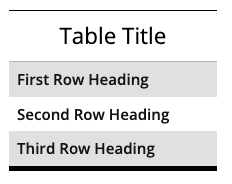
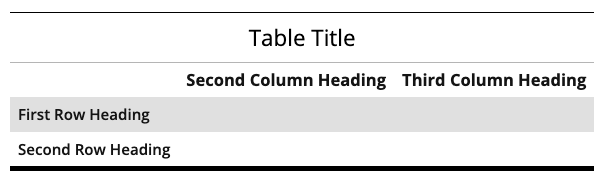
Use these snippets to insert the base code for a table that includes the correct code for accessible table headers and the heading row styling. Different options for the headings are available based on the layout you need. The table title can be turned off, the auto striped styling can be changed, rows and columns can be added, and a footer can be added.
There are many common issues you can watch for and best practices you can follow on your webpages to help increase the quality and search engine optimization (SEO) of your pages, meet accessibility requirements, and follow Michigan Tech’s editorial standards.
Specific instructions that may be included in this information are for Michigan Tech’s Modern Campus CMS.
Alt tags (also known as Image Descriptions or alt text) are very important for the accessibility of your webpage. Moz does a good job of explaining what alt tags are. Please take a moment to read up on what alt tags are and why they are important. Moz also provides some tips for how to write good ones.
There are many uses for alt tags. The most well-known ones are:
- Screen readers will speak the alt tag of an image for users who cannot see.
- If an image cannot be loaded due to some sort of network or IT error, the alt tag will display instead.
- Alt tags boost search engine rankings and can help your website’s images display in Google search results.
Michigan Tech has been using a tool called Siteimprove to find various issues on Modern Campus CMS webpages. The system has the ability to send scheduled reports to people on a regular basis. UMC created a custom CMS Content Editors Dashboard listing several quality, accessibility, search engine optimization (SEO), and editorial issues in one place. While Siteimprove has many more reports available, the selected issues have been identified as within the control of departmental CMS editors. This Dashboard replaces the previously available separate Broken Links and Misspellings reports.
Dashboard Reports
The CMS Content Editors Dashboard includes the following reports, subject to change at any time:
ALT tags (also known as alternative text, ALT text, or image descriptions) are an important factor in making your webpages accessible. This is also true for images used in your blog posts. Michigan Tech’s Accessible Technology Training Resources provides a training resource and guidelines for image ALT tags.
Being a web professional at a university can be difficult. Department chairs say things like “I want a website that looks different from everyone else.” A liaison says “I want the newest, craziest, most different website that you can make.” Everyone wants ‘cutting edge,’ although they don’t know what that means or why they are asking for it.
Those who don’t work in the web profession get lost in flashy designs, zany animations, and sparkles. They rarely analyze how many clicks it takes to get to the real information, how accessible a website is to those with disabilities, or how user-friendly a website is on an iPhone. They just want to be ‘wowed.’ Does their audience really want to be wowed, though?