
K-Day Registration
K-Day is just around the corner on September 11th, and registration is still open! K-Day is an annual student involvement fair held at Chassell Centennial Park with food, fun, and music! Typically 3500-4000 students come out for this event. This is a fantastic chance for your organization to showcase what you have to offer and attract new members.
Use this link to sign up to table at K-Day. Please have your organization’s activity finalized before registering. Registration closes September 4th but space is limited so do not delay! You can see which RSOs have already signed up for K-Day here.
RSO Re-Registration
RSO Re-registration is in full swing. As a quick reminder, Registered Student Organizations are required to re-register their organization to maintain their registered status. Required officers (President, Treasurer, Secretary, and Advisor) must complete the training on Canvas. Your organization’s president must also complete the re-registration form on Involvement Link. More specific information can be found on the SLI Blog and the RSO Officer or Advisor Canvas training.
RSO Constitution Audit
RSOs are required to audit their constitution every three years. RSOs starting with A-E are just wrapping up their audits. For the 26-27 academic year, all RSOs starting with F-O are required to audit their constitution to ensure it is up to date with SLI’s current RSO Constitution Requirements. You will be receiving an email from an SLI staff member with more information at the beginning of the school year.
It is important to note that you must complete your constitution audit before we will let you re-register your student organization. All A-E RSOs must complete their audit before the end of RSO Re-registration this September or risk losing their RSO status. All F-O RSOs will need to complete their audits before the end of RSO Registration fall of 2027. You can check on the status of your RSO Constitution Audit here.
HuskyEats Concessions
HuskyEats concessions is looking for any interested RSO who would like to work concessions during athletic events. They have opportunities for one org every home football game, and up to four orgs every home hockey game. The org is paid $300 for every game that they are working in the concession stand, and they request that at least 3 students from the org show up. If this is something your organization may be interested in, please email Abby Newman (Abby.Newman@compass-usa.com) for more information.
MUB 106 Conference Table Reservations
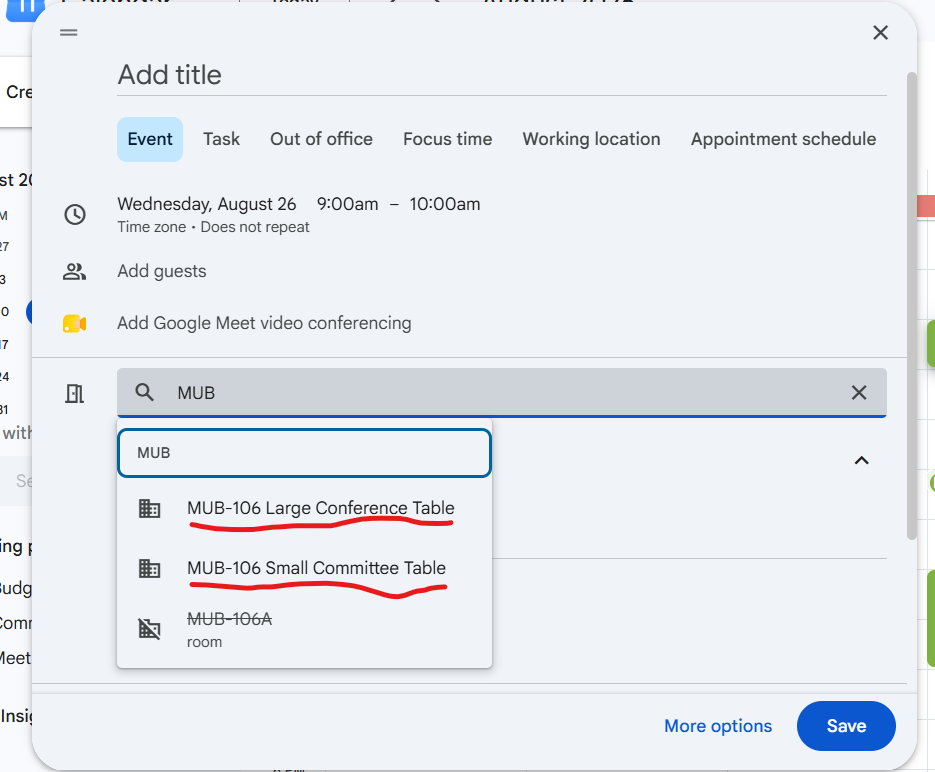
MUB 106 has several conference tables for RSOs to use. We have created a reservation system for them so you can guarantee a table for your meeting. You can reserve the tables using the “add rooms” option on a Google Calendar Event. The MUB-106 Large Conference Table can easily fit 12 people. The MUB-106 Small Committee Table can easily fit 4-6 people. Both tables have projecting options. Please note: the tables are not in private rooms and are not advised to use for sensitive information.
Homecoming
Homecoming is coming very quickly this year. Team registration opens Monday, August 24 at 8:00 AM, and closes Wednesday, September 9th at 11:59 PM. At least one representative from every registered Homecoming team must attend the Team Information Session on Thursday, September 10 at 6:30 PM in the MUB Alumni Lounge. Attendance is required for team eligibility. More information on Homecoming activities can be found on our website.
Tabling in the MUB Commons is free for Registered Student Organizations!
The MUB can provide a table for your group. Simply email mubrooms@mtu.edu to ask about available dates and times. RSOs can also reserve meeting and event space in the MUB at no cost. To request a space, log in to 25Live with your Michigan Tech SSO at https://25live.collegenet.com/pro/mtu, or email mubrooms@mtu.edu and they’ll be happy to help. Whether you’re planning a meeting, hosting an event, or just looking to get your organization in front of more students, they’d love to have you in the MUB!