Category: RSO Yearly Training

Find helpful instructions, training guides, and other items you may need to navigate your mandatory yearly RSO officer and advisor training.

RSO Officer September Email

RSO Re-registration

The first RSO Re-registration date is coming up. All officer training and the re-registration form must be completed by September 25, 2026 by 5:00 PM. Failure to complete your training on time will result in a decrease in your organization’s budget for this academic year and potential loss of privileges granted to registered groups. Please see the schedule below

  • You will receive 100% of your allocation if registered by 09/25/26 at 5pm.
  • You will receive 90% of your allocation if registered by 10/2/26 at 5pm.
  • You will receive 75% of your allocation if registered by 10/9/26 at 5pm.
  • You will receive 0% of your allocation if registered after 10/16/26 at 5pm.
  • You will lose all funding and RSO status if not registered by 10/16/26 at 5pm.

With K-Day just past and homecoming in full swing, we are a little slow on updating the RSO Re-registration document. If you completed the training and don’t see it updated right away, that is why. As things slow down, we will be more diligent in updating the form and approving re-registration forms regularly. Thank you for your patience. 

Plaidurday RSO Challenge

RSOs, it’s time to show off your plaid! Join us for a Plaidurday photo at the Houghton High School football field on Friday, October 2, and compete for a share of $300 in prizes.

  • Most members at the photo: $150
  • Highest percentage of members at the photo: $150
  • Ties will result in the prize being split between the winning RSOs.

Prize money will be added to the winning RSO’s Involvement Link donation account and can be used for organization activities, travel, and other eligible expenses.

The photo is at 1:30 p.m. at the Houghton High School football field. Free shuttles will leave Cliff Drive behind the Rozsa Center at 12:40 and 1:05 p.m., with rides back to campus after the photo.

Make sure your Involvement Link roster is up to date! We’ll use your roster to verify the competition results, so add new members and remove inactive members before Plaidurday.

Get your members together and help us fill Houghton with plaid!

Potato Festival

The City of Houghton, in partnership with the Carnegie Museum, is bringing back the Potato Festival on October 24, 2026! The festival will celebrate all the fun, creative, and surprising things you can do with potatoes—from potato batteries to unique food creations and everything in between.

Student organizations are invited to get involved! If your group has a fun potato-themed project, activity, demonstration, or showcase idea, we’d love to hear it. There are no bad ideas, so get creative!

Interested? Email Danielle Perkowitz at danielle@cityofhoughton.com to get involved!

SDC RSO Reservations

If your RSO plans to reserve space in the SDC, please follow these guidelines:

  • Reservations must be submitted at least two weeks in advance.
  • Cancellations must be made at least 48 hours prior to the scheduled reservation.
  • Student organizations that fail to provide at least 48 hours’ notice and do not use their reserved facility will be subject to the SDC cancellation/no-show policy:
    • First No-Show: Written warning issued to the organization.
    • Second No-Show: Loss of facility reservation privileges for two weeks.
    • Third No-Show: Loss of facility reservation privileges for the remainder of the semester.
  • All participants (both student and non-student)  must check in with facility staff before accessing the facility.

Membership and Facility Access

All non-student members of a student organization must have a valid SDC or Gates membership, punch pass, or day pass to access and use any indoor or outdoor Athletics & Recreation facilities.

Again, please take a moment to review the policies and procedures. Remember to submit all facility requests through our online reservation system.

Make a Difference Day

Make a Difference Day is the most encompassing national day of helping others—a celebration of neighbors helping neighbors. This annual tradition at Michigan Tech started as a student’s LeaderShape vision in fall of 2004 and has continued to be our largest day of service each year. The entire Michigan Tech community is invited to participate! 

Make a Difference Day is on Saturday, October 17th, starting with volunteer check-in at 9:30 AM in the MUB Commons, where each volunteer will receive a free t-shirt and bagel.

Register here for Make a Difference Day. Your RSO can volunteer at a site together! If you’re participating with a group, make sure everyone still registers individually. Volunteer registration closes October 11 at 11:59 PM.

Parents Fund Committee Needs a Student or Two!

The Tech Parents Annual Fund was created to support student organizations and enhance the student experience at Michigan Tech. The fund helps support speakers and programs, non-alcoholic social and community events, university traditions like K-Day and Winter Carnival, professional development and conference travel, competitions, and other events that encourage student involvement and connection on campus. You can learn more about the fund on the Parents Fund webpage.

We’re looking for 1–2 students to join the Parents Fund Committee! Committee members help review requests for funding. The committee meets whenever there is a request, so there are no regular meetings. If you’re interested in serving on the committee, please contact Rob Bishop at rmbishop@mtu.edu.

RSO Officer August Email

K-Day Registration

K-Day is just around the corner on September 11th, and registration is still open! K-Day is an annual student involvement fair held at Chassell Centennial Park with food, fun, and music! Typically 3500-4000 students come out for this event. This is a fantastic chance for your organization to showcase what you have to offer and attract new members.

Use this link to sign up to table at K-Day. Please have your organization’s activity finalized before registering. Registration closes September 4th but space is limited so do not delay! You can see which RSOs have already signed up for K-Day here.

RSO Re-Registration

RSO Re-registration is in full swing. As a quick reminder, Registered Student Organizations are required to re-register their organization to maintain their registered status. Required officers (President, Treasurer, Secretary, and Advisor) must complete the training on Canvas. Your organization’s president must also complete the re-registration form on Involvement Link. More specific information can be found on the SLI Blog and the RSO Officer or Advisor Canvas training.

RSO Constitution Audit
RSOs are required to audit their constitution every three years. RSOs starting with A-E are just wrapping up their audits. For the 26-27 academic year, all RSOs starting with F-O are required to audit their constitution to ensure it is up to date with SLI’s current RSO Constitution Requirements. You will be receiving an email from an SLI staff member with more information at the beginning of the school year.

It is important to note that you must complete your constitution audit before we will let you re-register your student organization. All A-E RSOs must complete their audit before the end of RSO Re-registration this September or risk losing their RSO status. All F-O RSOs will need to complete their audits before the end of RSO Registration fall of 2027. You can check on the status of your RSO Constitution Audit here.

HuskyEats Concessions

HuskyEats concessions is looking for any interested RSO who would like to work concessions during athletic events. They have opportunities for one org every home football game, and up to four orgs every home hockey game. The org is paid $300 for every game that they are working in the concession stand, and they request that at least 3 students from the org show up. If this is something your organization may be interested in, please email Abby  Newman (Abby.Newman@compass-usa.com) for more information. 

MUB 106 Conference Table Reservations
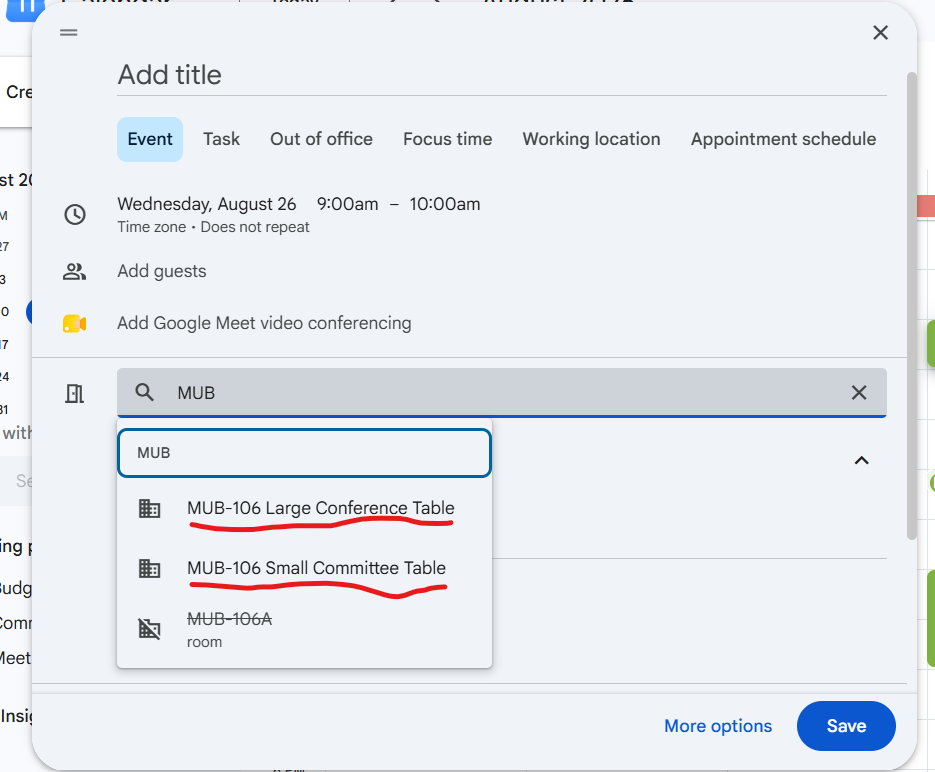
MUB 106 has several conference tables for RSOs to use. We have created a reservation system for them so you can guarantee a table for your meeting. You can reserve the tables using the “add rooms” option on a Google Calendar Event. The MUB-106 Large Conference Table can easily fit 12 people. The MUB-106 Small Committee Table can easily fit 4-6 people. Both tables have projecting options. Please note: the tables are not in private rooms and are not advised to use for sensitive information.

Homecoming

Homecoming is coming very quickly this year. Team registration opens Monday, August 24 at 8:00 AM, and closes Wednesday, September 9th at 11:59 PM. At least one representative from every registered Homecoming team must attend the Team Information Session on Thursday, September 10 at 6:30 PM in the MUB Alumni Lounge. Attendance is required for team eligibility. More information on Homecoming activities can be found on our website.

Tabling in the MUB Commons is free for Registered Student Organizations! 

The MUB can provide a table for your group. Simply email mubrooms@mtu.edu to ask about available dates and times. RSOs can also reserve meeting and event space in the MUB at no cost. To request a space, log in to 25Live with your Michigan Tech SSO at https://25live.collegenet.com/pro/mtu, or email mubrooms@mtu.edu and they’ll be happy to help. Whether you’re planning a meeting, hosting an event, or just looking to get your organization in front of more students, they’d love to have you in the MUB!

RSO Re-registration is now open!

RSO Re-registration is now open!

To complete your re-registration:

  1. All required officers and advisors must complete the training course on Canvas.
  2. The president must fill out the re-registration form on Involvement Link. Instructions for filling out the form can be found here. Some topics on the form includes:
    1. Making sure your RSO logo and social media accounts are compliant with UMC’s logo and branding guidelines?
    2. Making sure your RSO’s inventory listed on Involvement Link is up to date
    3. Providing your RSO’s banking and taxes information

If you are no longer an RSO officer, please communicate with your RSO’s president to submit an E-Board Position Update Form to notify us of any changes.

Everyone should have been added to the new Canvas training course. If you were not added, please reach out to rso@mtu.edu. Everyone must complete the training during the re-registration process; even if you have completed the training before. If you hold multiple officer positions, you must only complete the training once. If you have additional officers you would like to add to the officer training, they can use this link to sign up for the course: https://mtu.instructure.com/enroll/TCYD7M 

All officer training and the re-registration form must be completed by September 25, 2026 by 5:00 PM. Failure to complete your training on time will result in a decrease in your organization’s budget for this academic year and potential loss of privileges granted to registered groups. Please see the schedule below

  • You will receive 100% of your allocation if registered by 09/25/26 at 5pm.
  • You will receive 90% of your allocation if registered by 10/2/26 at 5pm.
  • You will receive 75% of your allocation if registered by 10/9/26 at 5pm.
  • You will receive 0% of your allocation if registered after 10/16/26 at 5pm.
  • You will lose all funding and RSO status if not registered by 10/16/26 at 5pm.

You can monitor the progress of your re-registration status on our Re-registration Google Sheet. This document is updated periodically. Any green box in an officer position means they have completed the Canvas Training. Any red box means the officer has not yet completed training. If your RSO has a yellow box in one of the officer positions, that means that we do not have an officer listed for your group. You will need to fill that position before your re-registration can be completed.

If you have any questions or concerns about the RSO registration process, training, or updating the RSO’s officer roster, please email Student Leadership and Involvement at rso@mtu.edu, stop by the office in MUB 112, or call us at 906-487-1963.

Have a great day,

Student Leadership and Involvement

RSO Re-registration is Starting Soon!

Hello,

We hope you’ve had a fantastic summer. RSO Re-registration is just around the corner and I wanted to make sure your RSO is ready. Please make sure your officers listed on Involvement Link are up to date!

RSO Re-Registration and Training

Every year, Registered Student Organizations are required to re-register their organization to maintain their registered status. Re-registration opens August 3rd at 9:00 AM. Required officers (President, Treasurer, Secretary, and Advisor) must complete the training on Canvas. Your organization’s president must also complete the re-registration form on Involvement Link. All officer training and the re-registration form must be completed by September 25, 2026, by 5:00 PM. Failure to complete your training on time will result in a decrease in your organization’s budget for this academic year and a potential loss of RSO status . Please see the schedule below:

  • You will receive 100% of your allocation if registered by 09/25/26 at 5pm.
  • You will receive 90% of your allocation if registered by 10/2/26 at 5pm.
  • You will receive 75% of your allocation if registered by 10/9/26 at 5pm.
  • You will receive 0% of your allocation if registered after 10/16/26 at 5pm.
  • You will lose all funding and RSO status if not registered by 10/16/26 at 5pm.

Please note: All officers and advisors will be removed from the Canvas training on July 27th, so the training can be updated and old officers removed. All current officers and advisors will be re-added to the new training at the beginning of re-registration. Every officer and advisor must complete the training every year during Re-registration.

Update Officers on Involvement Link

As we approach RSO Re-registration, it’s crucial to update your organization’s officers on Involvement Link. If the officers or advisors are not accurate on Involvement Link, the wrong people will get your re-registration information and training. To update your officers or advisors on Involvement link, presidents are required to fill out our E-Board Position Update Form.

K-Day Registration

K-Day registration is still open! The deadline to register for K-Day is September 4th at noon. We fully anticipate all our spots to be filled, so do not delay – register today! K-Day will be held on September 11th from 1:00-5:00 PM at Chassell Centennial Park.

April RSO Officer Email

Orientation and Welcome Week event submission reminder

Each year, Registered Student Organizations are invited to host events during Orientation Week and Welcome Week in order to introduce themselves to the campus community and welcome their peers to campus. The audience for Orientation Week is primarily first-year students, while events for Welcome Week should be designed for any member of the student body. This year:

  • O-Week is August 23rd-28th
  • Welcome Week is August 29th-September 5th

You must complete this form by April 13th in order to request to host an event during either week. Events planned through this form will be included in official Orientation or Welcome Week promotional materials. 

K-Day Registration Now Open

K-Day is just around the corner on September 11th, and registration is now open! K-Day is an annual student involvement fair held at Chassell Centennial Park with food, fun, and music! Typically 3500-4000 students come out for this event. This is a fantastic chance for your organization to showcase what you have to offer and attract new members.

Use this link to sign up to table at K-Day. Please have your organization’s activity finalized before registering. Registration closes September 4th but space is limited so do not delay!

RSO Re-Registration

Every year, Registered Student Organizations are required to re-register their organization to maintain their registered status. Re-registration opens August 10th at 9:00 AM. Required officers (President, Treasurer, Secretary, and Advisor) must complete the training on Canvas. Your organization’s president must also complete the re-registration form on Involvement Link. All officer training and the re-registration form must be completed by September 25, 2026, by 5:00 PM. Failure to complete your training on time will result in a decrease in your organization’s budget for this academic year and a potential loss of privileges granted to registered groups. Please see the schedule below:

You will receive 100% of your allocation if registered by 09/25/26 at 5pm.

You will receive 90% of your allocation if registered by 10/2/26 at 5pm.

You will receive 75% of your allocation if registered by 10/9/26 at 5pm.

You will receive 0% of your allocation if registered after 10/16/26 at 5pm.

You will lose all funding and RSO status if not registered by 10/16/26 at 5pm.

Please note: All officers and advisors will be removed from the Canvas training before Re-registration, so the training can be updated and old officers removed. All current officers and advisors will be re-added to the new training at the beginning of re-registration. Every officer and advisor must complete the training every year during Re-registration.

Update Officers on Involvement Link

As we approach RSO Re-registration, it’s crucial to update your organization’s officers on Involvement Link. If the officers or advisors are not accurate on Involvement Link, the wrong people will get your re-registration information and training. To update your officers or advisors on Involvement link, presidents are required to fill out our E-Board Position Update Form.

Please note: Only required officers (President, Treasurer, Secretary, Advisor) need to be added through the form. Organization-created positions can be updated directly on Involvement Link.

Advisor Appreciation Day – April 21st

April 21st is National Advisor Appreciation Day! In recognition of your dedicated advisors, we would like to invite you to pick up a thank you card (or multiple if you have multiple advisors!) from MUB 106 on top of the mailboxes to be signed by your organization’s members or executive board. This is an opportunity for you to express your gratitude for the guidance and support your advisors provide.

Cards can be returned to us in MUB 112 to be mailed or we invite you to deliver them in person! We encourage each of you to take a moment to acknowledge and appreciate your advisor for their commitment to your RSO.

Other Important Information

  • Purchase Requests for this fiscal year are due by April 12th! If you anticipate needing to make purchases after that date, but before the start of the school year, you must complete the summer RSO spending form. 
  • Check your MUB 106 mailbox! ALL ORGS have a mailbox! Please clean out your mailbox before leaving for the summer.

RSO Memories/Testimonials

Do you have a favorite memory or a positive story from your time with your RSO? We would love to hear it! Share your experience using our RSO Memories/Testimonial Form. Your submission may even be featured on our website and social media!

Prep for Recruitment Now!

Summer orientation sessions are fast approaching! That means incoming students are going to be scrolling on Involvement Link to learn about all the organizations Michigan Tech has to offer. 

Before you leave for the semester, don’t forget to freshen up your about page. Our top three suggestions are:

  1. Lead with your purpose, but clarify your process! Many “about” pages only describe the organization. That’s great, but many students’ next question is how to join. Let them know the best way to get on the mailing list, added to the roster, or when they can join you for your next event!
  2. Add links to your socials or post some pictures, so students know what it looks like to be a member of your organization. 
  3. Make sure your main contact email is up to date and able to receive communications. Some groups put an organization list-serv, but it is only set up for internal communications. Make sure interested students can contact you if they want to learn more!

If you want a bonus fourth suggestion, add a bit of news! How would you summarize the year, what are your goals for next year, etc. This would be a great way to keep a written and public record of your organization’s happenings. 

The MUB has space for your RSO! 

As you begin planning events and meetings for next semester, this is a friendly reminder that Memorial Union Building (MUB) spaces are available to reserve now. In most cases, MUB spaces can be reserved up to one year in advance. To submit a room request, please use the MUB reservation request page here. Not sure how to fill out the form? Follow this guide! Have questions? Email mubrooms@mtu.edu for support! If you have any further questions or need additional support, don’t hesitate to reach out to our team or stop by during our office hours. Thank you, the MUB looks forward to hosting your organization! 

Completing Your RSO Officer & Advisor Training – FAQ’s

It’s time for our yearly Registered Student Organization Officer and Advisor Training! Training includes the President, Vice President, Secretary, Treasurer, and Advisor. You have been added to a training path in Involvement Link made especially for your position. 
This training will guide you through the various expectations, policies, requirements, resources, and general operating standards of Registered Student Organizations (RSOs) at Michigan Tech.
You are required to complete all training items by Wednesday, September 28th, 2022 at 5 pm, in order for your RSO to complete the yearly re-registration process. When you have completed all training items, make sure you notify your RSO’s president so that they may move forward with RSO re-registration.  

Detailed Instructions

1. Navigate to https://www.involvement.mtu.edu/involvement/paths. If necessary, Log in using your MTU ISO.

2. Scroll down to the list of training modules and click “Expand All” to reveal the required training items

3. In each section of training, there will be a video to watch along with additional information which may appear after clicking “READ MORE”. The information below the video will include vital information, links, and instructions you will need to complete your training.

4. When you have completed watching each video, make sure you click the “Mark Complete” button at the bottom of the section, enter the date, and the requested reflection, and then be sure to click “Submit”. This will submit your progress to Student Leadership & Involvement and will make sure that you get credit for each section. You will need to click this button on all training items where it appears.

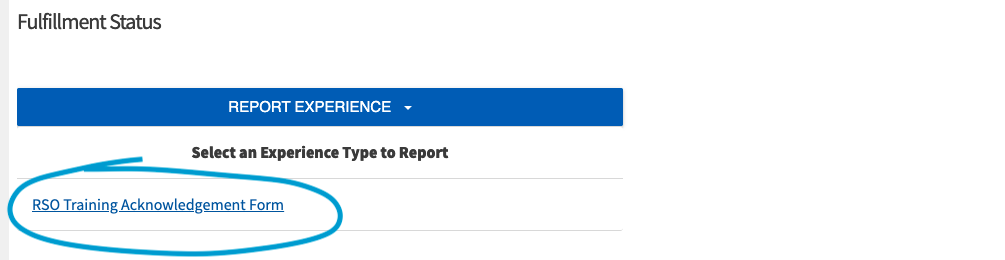
5. The final section, Training Confirmation, requires you to click on “Report Experience” to complete. When using this tool, you will be prompted to complete the RSO Training Acknowledgement Form.

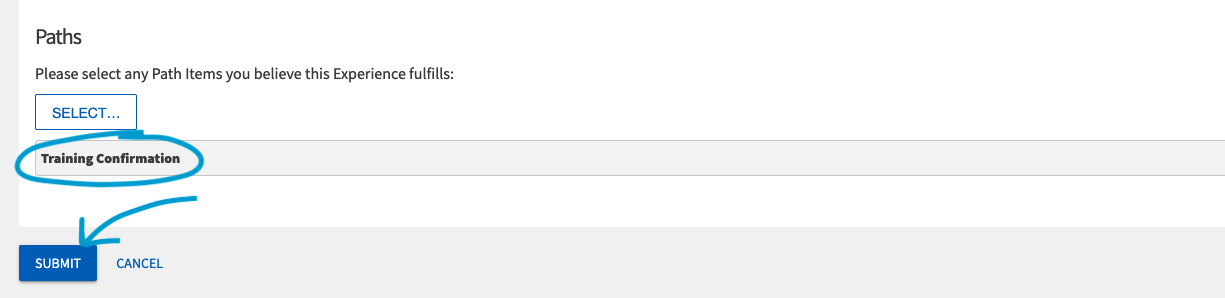
6. At the bottom of the RSO Training Acknowledgement Form, please do not change the options in the Path section “Please select any Path Items you believe this Experience fulfills:” as this will auto-generate the appropriate response – Training Confirmation

7. When complete, click “Submit” 

8. It will be necessary for you to wait for your submission to be approved by Student Leadership & Involvement before your training will be marked as 100% complete. Until it is approved by SLI, you will see a green hourglass next to the appropriate training item.

9. Within 1-2 business days, Student Leadership & Involvement will approve your submissions or return them for revision. When your training progress is listed at 100% please email your RSO’s president to let them know they may proceed with re-registration. If you are the President, make sure your other Officers complete their training and then proceed with re-registration.

FAQ’s

When is the deadline to complete training? – Thursday, September 29 at 5:00 PM. But we encourage you to complete your training early to avoid any potential complications with RSO re-registration.

I completed all of the sections but my progress bar does not say 100% complete, what’s up with that? – If you just finished, don’t worry! It will take the SLI staff a couple business days to check all of the progress that you made. If it has already been a couple business days, shoot us a message at rso@mtu.edu and let us know so we can look into it.

I’m the President of my RSO and I submitted my org re-registration but it hasn’t been approved, why? – Often, the biggest reason that we are unable to approve RSO re-registration is because all of the officers and advisor have yet to finish their training. Confirm with them that they are 100%!

I’m the President of my RSO, but I’m also the secretary of another org, why do I have to take all of these trainings? – Don’t worry! If you are the President, you do not have to take any other training! If you hold more than one officer position in general, you only need to complete one officer training. Please complete the training according to this priority order: President, Treasurer, Vice President, Secretary.

We haven’t heard from our Advisor and we want to complete our re-registration, what should we do? – Let us know right away by emailing rso@mtu.edu so we can start helping you find a new advisor… don’t wait until the deadline to tell us!

I’m signed up for the Secretary training, but I’m the Vice President, now what? – First, make sure your RSO Roster lists you as the correct position. If it does not, make sure that you, your primary contact, or your president updates it RIGHT AWAY! Next, shoot us an email at rso@mtu.edu and let us know of the error so we can move you into the correct training before you complete any sections that you may not have to.

I’m having other issues with training that aren’t addressed here, what should I do? – We are sorry to hear that! You can either email rso@mtu.edu, stop by MUB 112, or call 906-487-1963 and let us know what your issue is so we can assist.